Wild Bird Hunter Game – Play the Bird Shooting Adventure Online
Play Wild Bird Hunter Game online and test your aiming, timing, and shooting skills in a colorful wilderness environment! Track flying birds, hit moving targets, build combos, complete challenging levels, and beat your high score.
Wild Bird Hunter is a fast-paced bird shooting arcade game that combines first-person aiming, moving targets, responsive controls, colorful outdoor environments, and progressively challenging levels.
Birds can appear from different directions and fly at different heights and speeds. You must aim carefully, wait for the right moment, and take your shot before the timer or ammunition runs out.
The game is designed for both desktop and mobile devices, making it easy to enjoy quick hunting-style arcade challenges wherever you play.
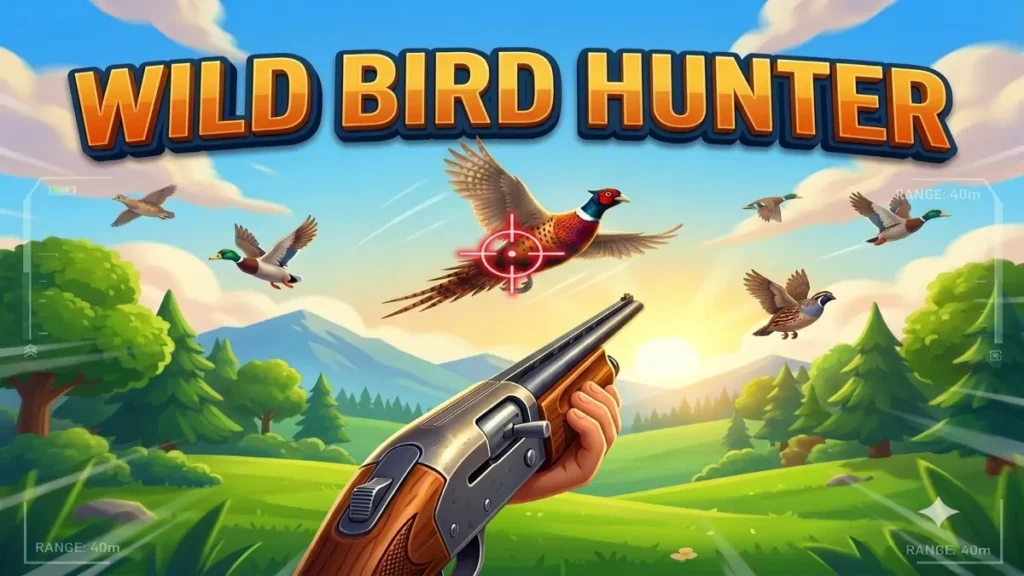
🎮 Play Wild Bird Hunter Online
In Wild Bird Hunter, you enter a beautiful outdoor wilderness environment filled with:
- Bright blue skies
- White clouds
- Green grass
- Trees
- Bushes
- Mountains
- Lakes
- Warm sunlight
- Flying birds
- Atmospheric backgrounds
The game uses a first-person perspective, putting the player directly into the action.
A stylized shotgun appears naturally at the bottom of the screen while birds fly through the environment.
Your objective is simple:
Aim → Shoot → Hit the Bird → Earn Points → Complete the Level
🦅 How to Play Wild Bird Hunter
Wild Bird Hunter is easy to understand but becomes increasingly challenging as you progress.
Step 1 – Start the Game
Click PLAY GAME from the main menu.
Choose an unlocked level and prepare for the challenge.
Step 2 – Find the Birds
Watch the sky carefully.
Birds can appear:
- From the left
- From the right
- From above
- At different distances
- At different heights
- At different speeds
You need to react quickly before the bird leaves the playable area.
Step 3 – Aim
Move your mouse on desktop or drag your finger on mobile to control the aim.
The crosshair follows your movement.
Do not rely on automatic targeting.
Your shooting accuracy determines how many birds you can hit.
Step 4 – Shoot
On desktop, press the left mouse button to fire.
On mobile, tap the large SHOOT button.
When you successfully hit a bird, it reacts to the shot and falls naturally through the environment.
Step 5 – Earn Points
Different birds can award different amounts of points.
Small and difficult targets can reward more points than slower, larger birds.
Precision shots can also provide bonus points.
Step 6 – Complete the Objective
Every level has a specific target.
For example:
BIRDS REQUIRED: 5
You must hit the required number of birds before the timer or available ammunition runs out.
🔫 First-Person Shooting Experience
Wild Bird Hunter uses a first-person camera to create an immersive arcade experience.
The shotgun appears at the bottom of the screen without covering too much of the gameplay area.
The weapon can include:
- Detailed barrel
- Stock
- Hands
- Idle movement
- Recoil animation
- Muzzle flash
- Smoke
- Shell ejection
- Reload animation
The environment and flying birds remain the main focus of the screen.
🐦 Different Bird Types
Wild Bird Hunter features multiple bird types with different characteristics.
Possible bird types include:
🐦 Sparrow
Small and relatively fast.
Difficulty: Medium
Points: 50
🕊️ Pigeon
Medium-sized bird with balanced speed.
Difficulty: Easy–Medium
Points: 100
🦆 Duck
Larger target with slower flight.
Difficulty: Easy
Points: 100
🦅 Eagle
Large but faster and more unpredictable.
Difficulty: Hard
Points: 200
🦅 Hawk
Fast-moving bird requiring quick reactions.
Difficulty: Hard
Points: 200
🐦 Crow
Dark silhouette and unpredictable movement.
Difficulty: Hard
Points: 250
🦅 Falcon
One of the fastest birds in the game.
Difficulty: Expert
Points: 300
Each bird can have its own size, silhouette, speed, wing animation, and movement pattern.
🪽 Realistic Bird Flight Patterns
Birds don’t simply move from one side of the screen to the other.
Different birds can use different flight behaviors.
Possible patterns include:
- Left-to-right flight
- Right-to-left flight
- Diagonal movement
- Rising flight
- Descending flight
- Circular movement
- Zig-zag movement
- Fast dives
- Slow gliding
- Randomized movement
This makes every encounter less predictable.
🪽 Animated Bird Wings
Birds continuously flap their wings while flying.
Different bird species can use different wing speeds.
For example:
Sparrow: Fast wing flapping
Pigeon: Medium wing flapping
Eagle: Slow, powerful wing movement
Falcon: Fast and aggressive movement
The animation can be created using lightweight Canvas or procedural graphics rather than relying on heavy external assets.
🎯 Shooting and Hit System
Wild Bird Hunter is designed around responsive shooting.
When you fire, several effects can happen almost simultaneously:
- Muzzle flash appears.
- Shotgun recoils.
- Camera shakes slightly.
- Smoke appears.
- Shot sound plays if enabled.
- Projectile or pellet effect appears.
- Hit detection is performed.
- Score is calculated.
- Bird hit animation begins.
- Floating score appears.
These small effects make every successful shot feel satisfying.
💥 Bird Hit Reaction
When a bird is successfully hit, it should not simply disappear.
Instead, it can:
- Stop its normal flight
- React to the impact
- Rotate slightly
- Begin falling
- Spawn a few feather particles
- Move naturally downward
- Leave the playable area
The game should remain non-graphic, with no blood or gore.
🎯 Precision Hit
Wild Bird Hunter includes a precision-hit mechanic.
If the player successfully hits the bird’s central target zone, they can receive a bonus.
Example:
PRECISION HIT!
+100 BONUS
Precision hits can reward players who carefully aim rather than simply shooting rapidly.
🏆 Scoring System
Different birds can have different point values.
Example:
| Target | Points |
|---|---|
| Small Bird | +50 |
| Medium Bird | +100 |
| Large Bird | +200 |
| Fast Bird | +300 |
| Precision Hit | +100 Bonus |
| Combo Bonus | +50+ |
The score should appear clearly in the HUD without blocking the gameplay.
🔥 Combo System
Consecutive successful hits can create a combo.
For example:
COMBO x2
COMBO x3
COMBO x4
COMBO x5
The longer your hit streak continues, the higher your score multiplier can become.
However, missing a shot resets the combo.
This encourages players to aim carefully rather than shooting randomly.
💯 Floating Score Effects
After successfully hitting a bird, floating text can appear near the target.
Examples:
+100
+200
PRECISION HIT!
COMBO x3
The score text can move upward and fade away smoothly.
This gives players immediate feedback after every successful shot.
🔫 Ammunition System
Players have limited ammunition during gameplay.
The HUD can display:
AMMO
5 / 5
Every shot reduces the available ammunition.
When ammunition reaches zero, the player must reload.
Reloading can be:
- Automatic
- Manual
- Button controlled
During reload, shooting should be disabled.
🔄 Reload System
Desktop players can press:
R = Reload
Mobile players can use a dedicated reload button when required.
A short reload animation can be shown on the shotgun.
The weapon should return to its normal position after reloading.
⏱️ Timer System
Each level has a limited amount of time.
Example:
TIME 00:45
The timer continuously decreases while the level is active.
If the player reaches the required bird count before the timer expires, the level is completed.
If the timer reaches zero first, the player receives a Game Over screen.
🗺️ Wild Bird Hunter Level System
Wild Bird Hunter can include 30+ progressively challenging levels.
Each level introduces a greater challenge.
Level 1
- Slow birds
- Large targets
- Few birds
- 60-second timer
Birds Required: 5
Ammo: 10
Level 2
- More birds
- Slightly faster movement
Birds Required: 8
Ammo: 12
Level 3
- Faster birds
- Different directions
Birds Required: 10
Ammo: 12
Levels 4–10
Introduce:
- Smaller birds
- Faster movement
- Multiple flight patterns
- More simultaneous birds
- Reduced time
Levels 11–20
Introduce:
- Advanced flight patterns
- Fast birds
- Difficult targets
- Environmental changes
- Special challenges
Levels 21–30
Introduce:
- Very fast birds
- Smaller targets
- Multiple birds simultaneously
- Shorter timers
- Advanced movement patterns
- Special weather conditions
🌄 Different Wilderness Environments
Wild Bird Hunter can feature multiple environments as players progress.
Level 1 – Green Countryside
A bright and relaxing environment featuring:
- Green grass
- Trees
- Blue sky
- White clouds
- Distant mountains
Level 5 – Mountain Lake
Add:
- Large mountains
- Water
- Lakeside vegetation
- Atmospheric depth
Level 10 – Autumn Forest
Introduce:
- Autumn-colored trees
- Forest environment
- Warm lighting
Level 15 – Sunny Meadow
A wide-open environment with:
- Grass
- Bushes
- Trees
- Bright sunlight
Level 20 – Mountain Valley
A dramatic landscape featuring:
- Tall mountains
- Valley terrain
- Clouds
- Atmospheric layers
Level 25 – Golden Sunset
Introduce:
- Warm sunset lighting
- Orange sky
- Long shadows
- Atmospheric effects
Level 30 – Foggy Wilderness
The final environment can feature:
- Light fog
- Reduced visibility
- Mountain silhouettes
- Atmospheric particles
Visibility should always remain sufficient for fair gameplay.
☁️ Dynamic Clouds
Clouds slowly move through the sky.
They should move independently from birds.
This helps make the environment feel alive without adding heavy performance requirements.
🌿 Environmental Animation
Small environmental movements can make each level feel more dynamic.
Examples include:
- Moving grass
- Slightly moving bushes
- Tree movement
- Floating particles
- Moving clouds
- Subtle wind effects
These animations should remain lightweight so they don’t negatively affect mobile performance.
🌦️ Weather and Special Levels
Later levels can introduce atmospheric variations such as:
- Light fog
- Sunset
- Stronger wind
- Cloudy skies
- Different lighting
The effects should enhance the environment without making birds impossible to see.
⚡ Power-Ups
Optional power-ups can make advanced levels more interesting.
🎯 Precision Aim
Temporarily improves targeting feedback and enlarges the crosshair.
🐌 Slow Motion
Temporarily slows bird movement.
🔫 Extra Ammo
Adds additional ammunition to the current level.
💥 Multi Shot
Allows a short multi-pellet shot.
🦅 Eagle Eye
Highlights nearby birds for a limited amount of time.
Power-ups should appear gradually rather than overwhelming players from the beginning.
📱 Mobile Controls
Wild Bird Hunter is designed for mobile gameplay.
Players can:
Drag: Aim
Tap SHOOT: Fire
Tap RELOAD: Reload
Tap PAUSE: Pause
A large circular SHOOT button should be positioned near the bottom-right corner.
Controls should be large enough for comfortable use on smartphones and tablets.
The game should also prevent accidental webpage scrolling while the player is interacting with the gameplay area.
🖱️ Desktop Controls
Desktop controls are simple:
| Action | Control |
|---|---|
| Aim | Mouse |
| Shoot | Left Click |
| Precision / Zoom | Right Click |
| Reload | R |
| Pause | P |
| Exit Overlay / Fullscreen | ESC |
The mouse should provide smooth manual aiming without automatically locking onto birds.
🎯 Crosshair System
A responsive crosshair follows the player’s mouse or touch position.
The crosshair can contain:
- Outer circle
- Center dot
- Direction markings
When the crosshair moves over a bird, subtle feedback can appear.
For example:
Normal target: Standard crosshair
Bird detected: Highlighted crosshair
Precision zone: Stronger target indicator
The system should provide feedback without automatically aiming for the player.
🖥️ Responsive Design
Wild Bird Hunter should work across:
- Android phones
- iPhones
- Android tablets
- iPads
- Mobile landscape
- Tablet landscape
- Laptops
- Desktop computers
- Large monitors
The game should use a responsive Canvas rather than a fixed-size gameplay area.
Canvas dimensions should respond to:
window.innerWidthwindow.innerHeightdevicePixelRatio
This helps maintain clear visuals across different screen sizes.
📱 Mobile Portrait Mode
In portrait mode:
- Environment fills the available screen
- HUD becomes compact
- Shotgun scales appropriately
- Shoot button remains large
- Crosshair stays easy to see
- Important gameplay remains unobstructed
🖥️ Desktop Mode
On desktop:
- Gameplay remains centered
- The environment uses a large play area
- HUD remains compact
- Shotgun stays near the bottom
- Ultrawide displays should not excessively stretch the game
🖥️ Fullscreen Mode
A fullscreen button allows players to expand the game.
When fullscreen is activated:
- Enter browser fullscreen
- Resize Canvas
- Recalculate game dimensions
- Maintain correct aspect ratio
When fullscreen is closed, the game should automatically return to its normal layout.
🏆 Level Complete
When the player hits the required number of birds, display a polished results screen.
Example:
LEVEL COMPLETE!
Birds Hit: 10
Accuracy: 82%
Score: 2,450
Best Combo: x4
★ ★ ★
[ NEXT LEVEL ]
⭐ Three-Star Rating
Players can receive between one and three stars based on:
- Score
- Accuracy
- Time remaining
- Number of misses
- Combo performance
A perfect performance can award:
★ ★ ★
Stars are saved using local storage and contribute to overall progress.
💀 Game Over
Game Over occurs when the player fails to complete the required objective before the level ends.
Possible reasons include:
- Timer reaches zero
- Not enough birds are hit
- Level objective isn’t completed
Example result:
GAME OVER
Score: 2,450
Birds Hit: 6
Accuracy: 61%
[ TRY AGAIN ]
[ MAIN MENU ]
🏠 Wild Bird Hunter Main Menu
The main menu should feature a beautiful animated wilderness background.
Title:
WILD BIRD HUNTER
Subtitle:
REAL HUNTING EXPERIENCE
Main buttons:
PLAY GAME
SELECT LEVEL
HOW TO PLAY
SETTINGS
Additional information:
HIGH SCORE
TOTAL STARS
LEVEL PROGRESS
🗺️ Level Selection
The Level Select screen can display levels in a responsive grid.
Example:
1 2 3 4 5
6 7 8 9 10
11 12 13 14 15
Locked levels can display:
🔒
Completed levels can display:
★ ★ ★
Players unlock new levels by successfully completing previous challenges.
⏸️ Pause Menu
Players can pause the game at any time.
The pause screen displays:
PAUSED
[ RESUME ]
[ RESTART ]
[ MAIN MENU ]
When paused, the timer and bird movement should stop.
⚙️ Settings
The Settings menu can include:
Sound: ON / OFF
Music: ON / OFF
Vibration: ON / OFF
Graphics: LOW / MEDIUM / HIGH
Sensitivity: LOW / MEDIUM / HIGH
Fullscreen: ON / OFF
Settings should be saved using local storage.
🎨 Graphics Quality
Players can choose from three graphics modes.
LOW
- Reduced particles
- Reduced environmental animation
- Lower rendering resolution
MEDIUM
- Standard effects
- Normal environmental animation
HIGH
- Full particle effects
- Enhanced environmental animation
- Higher-quality visual effects
The game can also automatically select a suitable default based on device performance.
🔊 Sound Effects
Optional sounds can be used for:
- Shooting
- Reloading
- Bird hit
- Precision hit
- Combo
- Level complete
- Button clicks
- Game Over
Audio should not autoplay before the player interacts with the game.
Players can disable sound and music from Settings.
📳 Mobile Vibration
On supported mobile devices, vibration can provide additional feedback.
For example:
Shot: Short vibration
Successful hit: Slightly stronger vibration
Level complete: Celebration vibration
Players can disable vibration whenever they want.
🚀 Performance Optimization
Wild Bird Hunter is designed to run smoothly on mobile and desktop.
The game should target approximately 60 FPS where supported by the device.
Performance techniques include:
requestAnimationFrame()- Canvas rendering
- Lightweight graphics
- Limited particles
- Efficient bird management
- Object pooling
- Minimal DOM elements
- Optimized collision detection
- Responsive Canvas scaling
Avoid unnecessary heavy libraries and huge image assets.
🎯 Why Play Wild Bird Hunter?
Wild Bird Hunter combines simple controls with increasingly difficult arcade gameplay.
The game is perfect for players who enjoy:
- Shooting games
- Arcade games
- Bird games
- Aim-and-shoot games
- Casual games
- Skill games
- Score-chasing games
- Mobile games
- Fast challenges
Every level gives you another opportunity to improve your accuracy and beat your previous score.
💡 Wild Bird Hunter Tips and Tricks
1. Don’t Shoot Too Quickly
Wait for the bird to enter a comfortable position before firing.
2. Watch the Flight Pattern
Birds can change direction and speed.
Learn their movement before taking the shot.
3. Aim Ahead
For fast-moving birds, aim slightly ahead of their direction of travel.
4. Protect Your Ammo
Don’t waste ammunition on difficult shots unless you’re confident.
5. Build Combos
Consecutive successful hits increase your score potential.
6. Go for Precision Hits
Accurate shots can provide additional points.
7. Watch the Timer
Don’t spend too much time waiting for a perfect shot when the level timer is running low.
🏹 Become the Ultimate Wild Bird Hunter
The sky is full of targets.
Birds are flying from every direction.
Your ammunition is limited.
The clock is ticking.
Can you hit enough birds to complete every level?
Take aim, improve your accuracy, build massive combos, and work your way through increasingly challenging wilderness environments.
Play Wild Bird Hunter now on MiniGamesPlay
What is Wild Bird Hunter?
Wild Bird Hunter is a colorful arcade bird shooting game where players aim at flying birds, earn points, build combos, and complete progressively difficult levels.
Can I play Wild Bird Hunter online?
Yes. A browser version can be played directly online without requiring a separate installation.
Is Wild Bird Hunter free to play?
The web version on MiniGamesPlay can be offered as a free browser game.
Can I play Wild Bird Hunter on mobile?
Yes. The game is designed for smartphones and tablets with touch-friendly aiming and shooting controls.
Can I play Wild Bird Hunter on PC?
Yes. Desktop players can use mouse aiming and left-click shooting.
How do I aim in Wild Bird Hunter?
Move the mouse on desktop or drag your finger on mobile to control the crosshair.