3D Block Rolling Puzzle is a challenging 3D logic and spatial puzzle game where you control a rectangular stone block across floating platforms filled with dangerous gaps, fragile tiles, switches, bridges, teleporters, ice, moving platforms, and other interactive obstacles.
Your objective sounds simple: roll the block across the platform and make it stand perfectly upright inside the goal hole.
However, every move changes the orientation and position of the block. A move that looks safe may leave the block lying in the wrong direction, place it near the edge of the platform, or send it falling into the sky below.
To complete each level, players need to think ahead, understand how the block rotates, activate switches, use bridges correctly, avoid dangerous tiles, and reach the final goal with the correct orientation.
With smooth 3D graphics, an isometric camera, realistic lighting, responsive controls, mobile touch support, multiple puzzle mechanics, level progression, achievements, statistics, and a built-in level editor, Rolling Block Puzzle Game is designed to offer a premium browser puzzle experience on both desktop and mobile devices.
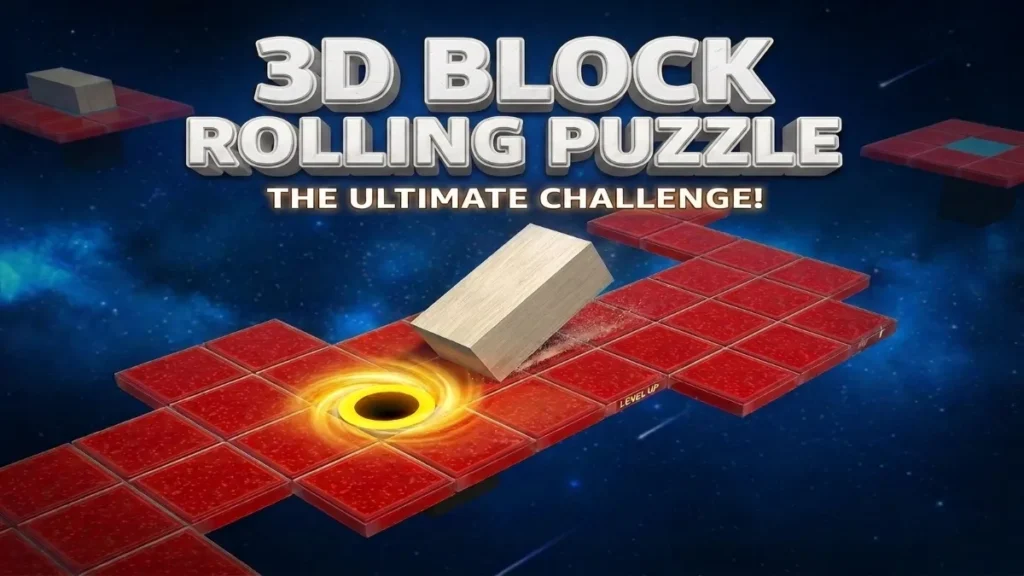
🎮 What Is 3D Block Rolling Puzzle?
3D Block Rolling Puzzle (3D Logic Puzzle) is a browser-based spatial puzzle game built around a simple 1×2 rectangular block.
Instead of controlling a character that walks normally, the player moves by rolling the block through 90-degree rotations.
The block can exist in different orientations.
It can be:
- Standing vertically on one tile
- Lying horizontally across two tiles
- Lying vertically across two tiles
Because the block changes orientation after every roll, players cannot simply follow the shortest-looking path.
You need to think about where the block will land after each move.
Games built around this mechanic commonly require a rectangular block to alternate between upright and flat positions while navigating a grid toward an upright goal.
That means reaching the goal tile is only part of the puzzle.
The block must also reach it in the correct position.
🧱 Your Main Objective
Your goal in every level is to guide the stone block from its starting platform to the goal hole.
The final move must position the block vertically above the goal.
If the block is lying across the goal rather than standing upright, the puzzle is not complete.
This creates an additional layer of strategy.
You need to consider:
- Your current position
- Your current orientation
- Available platform tiles
- The location of the goal
- How many moves are required
- Which direction the final roll should come from
- Whether switches or bridges must be activated first
A good solution requires both movement planning and spatial thinking.
🕹️ How to Play 3D Block Rolling Puzzle
Playing the game is easy to understand.
Use the movement controls to roll the block one move at a time.
Every input rotates the block by approximately 90 degrees onto the next tile or pair of tiles.
Your basic gameplay loop is:
Observe → Plan → Roll → Activate → Balance → Reach Goal
Before making a move, look at the platform ahead.
If there is no solid tile supporting the block after the roll, the block will fall.
The level must then be restarted or restored using the Undo feature.
⌨️ Desktop Controls
Desktop and laptop players can use either the arrow keys or WASD controls.
| Control | Action |
|---|---|
| W / ↑ | Roll Forward |
| S / ↓ | Roll Backward |
| A / ← | Roll Left |
| D / → | Roll Right |
| U | Undo |
| R | Restart |
| P | Pause |
| Esc | Close Menu / Exit Fullscreen |
The controls are designed to feel immediate while the block itself uses a smooth rolling animation rather than instantly jumping between grid positions.
📱 Mobile Controls
Mobile players can control the block using touch.
The game can support:
- Swipe up
- Swipe down
- Swipe left
- Swipe right
- On-screen directional buttons
Large touch-friendly buttons make the game easier to play on Android phones, iPhones, and tablets.
Swipe controls provide a natural way to roll the block while keeping most of the screen clear for the 3D environment.
🧠 Plan Every Move Carefully
The most important part of 3D Block Rolling Puzzle is planning.
Each block orientation has a different footprint.
When standing vertically, the block occupies one platform tile.
When lying down, it occupies two.
That difference affects whether the next move is possible.
For example, a narrow platform may support a standing block but may not have enough space for the block after it rolls flat.
Likewise, some paths require the player to deliberately move away from the goal before returning from another direction.
This makes the game more about logic than speed.
🪨 Realistic Stone Block
The main block uses a premium stone-inspired appearance.
Visual details can include:
- Stone surface material
- Rough texture
- Edge details
- Soft reflections
- Realistic shadows
- Ambient lighting
- Smooth contact animation
- Small landing effects
When the block moves, it performs a controlled 90-degree rotation around the correct edge.
The animation makes each movement feel physical instead of simply teleporting the object from one square to another.
🎥 Smooth Isometric 3D Camera
The game uses an isometric-style camera angle that allows players to clearly see the platform layout.
The camera can gently follow the block as it moves through larger levels.
Additional camera effects include:
- Smooth follow movement
- Gentle zoom
- Level-start transitions
- Winning camera animation
- Camera shake when falling
- Smooth repositioning
- Wide view of important puzzle areas
The goal is to provide a good view of the puzzle without making movement confusing.
🧩 Normal Platform Tiles
Normal tiles form the basic structure of each level.
These tiles safely support the block whether it is standing or lying down.
Early levels mostly use normal platforms to help players understand:
- Block orientation
- Movement distance
- Edge detection
- Goal positioning
More advanced levels combine normal tiles with special interactive tiles.
💔 Fragile Tiles
Fragile tiles introduce additional risk.
The block may be able to move across these tiles while lying flat, but standing vertically on a fragile tile can cause it to break.
When a fragile tile breaks:
- The surface cracks.
- Small debris particles appear.
- The tile collapses.
- The block falls.
- The level is lost or restored with Undo.
This forces players to think not only about where they move but also about how the block lands.
🔘 Light Switches
Light switches can activate when any part of the block touches them.
A light switch might:
- Open a bridge
- Close a bridge
- Reveal a path
- Activate a moving platform
- Disable an obstacle
Because the block does not need to stand upright, these switches are easier to activate than heavy switches.
⚙️ Heavy Switches
Heavy switches require greater pressure.
They activate only when the block stands vertically directly on top of them.
This means players need to approach the switch with the correct orientation.
Heavy switches create more complicated puzzles because reaching the switch is not enough.
You must reach it upright.
🌉 Animated Bridges
Bridges can connect separated platform sections.
A bridge may begin:
- Open
- Closed
- Hidden
- Raised
- Lowered
Activating a connected switch can cause the bridge to move into place.
Bridge animations can include mechanical movement, stone sliding, metal rotation, sound effects, and particles.
Players need to remember which switches control which bridges.
✨ Teleport Tiles
Teleport tiles instantly move the block between different areas of a level.
When activated, the game can display:
- Glowing portal effect
- Particle burst
- Light beam
- Dissolve animation
- Smooth camera transition
Teleport puzzles can be especially challenging because the block’s orientation after teleportation can affect the next available moves.
🧊 Ice Tiles
Ice tiles change normal movement behavior.
Instead of stopping immediately, the block may continue moving in the chosen direction until it reaches a normal tile, obstacle, or edge.
Ice levels require players to calculate movement before committing.
One incorrect direction can send the block sliding off the entire platform.
🚚 Moving Platforms
Moving platforms add timing and positioning challenges.
Platforms can move:
- Left and right
- Forward and backward
- Up and down
- Between islands
- Along predefined paths
The player may need to wait for the correct moment before rolling onto the platform.
👻 Disappearing Tiles
Some tiles can disappear after being touched.
These create routes that may only be used once.
After the block leaves the tile:
- It begins flashing.
- A countdown effect starts.
- The tile fades or collapses.
Players must avoid unnecessary moves because returning along the same route may no longer be possible.
🚩 Checkpoints
Larger levels can include checkpoints.
When the block reaches a checkpoint, the game stores that position temporarily.
If the player falls later, the level can restart from the checkpoint instead of requiring the entire puzzle to be completed again.
Checkpoints are especially useful for advanced multi-stage levels.
🕳️ Goal Hole
The goal hole is the final destination.
To complete the puzzle, the block needs to stand vertically on the goal tile.
Once properly aligned:
- The goal activates.
- The block begins a winning animation.
- The block drops into the goal.
- Particles and lighting effects appear.
- The level score is calculated.
- Stars are awarded.
- The next level becomes available.
⭐ Star Rating System
Each level can award up to three stars.
Stars can be based on:
- Number of moves
- Completion time
- Number of Undo uses
- Whether the player restarted
- Optimal solution target
Example:
1 Star: Complete the level
2 Stars: Complete within the target move range
3 Stars: Complete with excellent efficiency
This encourages players to replay completed levels.
🔢 Move Counter
Every roll counts as one move.
The move counter is displayed during gameplay.
Example:
Moves: 18
Levels can also display a target such as:
Best: 14 Moves
This encourages players to search for a more efficient solution.
⏱️ Timer
A timer records how long the player takes to complete each puzzle.
The game does not necessarily need to force players to hurry.
Instead, completion time can be used for:
- Personal best records
- Star calculations
- Statistics
- Achievements
Players who prefer relaxed puzzle solving can still take their time.
↩️ Undo System
The Undo button allows players to reverse their previous move.
This is useful when a player realizes that a movement creates a dead end.
Undo can restore:
- Block position
- Block orientation
- Switch states
- Bridge states
- Tile states
- Relevant platform states
A well-designed Undo system makes experimentation less frustrating.
🔄 Restart Level
Players can restart the current puzzle at any time.
Restart resets:
- Block position
- Orientation
- Bridges
- Switches
- Moving objects
- Broken tiles
- Timer
- Move counter
Restart should happen quickly so the player can immediately try another strategy.
📈 Progressive Level Difficulty
The game should begin with simple layouts and gradually introduce advanced mechanics.
Beginner Levels
Early puzzles teach:
- Basic movement
- Standing and lying positions
- Platform boundaries
- Goal alignment
Intermediate Levels
Later puzzles introduce:
- Fragile tiles
- Light switches
- Bridges
- Narrow platforms
- Multiple routes
Advanced Levels
Advanced stages can include:
- Heavy switches
- Teleports
- Ice
- Moving platforms
- Disappearing tiles
- Multiple bridges
- Multi-stage puzzles
- Checkpoints
Players learn each mechanic gradually instead of facing everything at once.
🗺️ JSON-Based Level System
Levels can be stored using structured JSON data.
This makes it easier to add additional puzzles without rebuilding the game engine.
A level definition can include:
- Platform layout
- Starting position
- Goal position
- Tile type
- Switch configuration
- Bridge connections
- Teleporter destinations
- Moving platform paths
- Difficulty
- Target moves
- Star requirements
This system also supports the built-in level editor.
🛠️ Built-In Level Editor
One of the most powerful features of 3D Block Rolling Puzzle is the level editor.
Players or developers can design custom levels directly inside the browser.
The editor can include:
- Place normal tiles
- Add fragile tiles
- Add switches
- Add bridges
- Add teleports
- Add ice
- Add moving platforms
- Place checkpoints
- Select start position
- Place goal hole
- Delete tiles
Once the puzzle is created, it can be previewed and tested.
📤 Export and Import JSON
Custom levels can be exported as JSON.
This allows creators to:
- Save designs
- Back up levels
- Transfer them between devices
- Edit data manually
- Share custom puzzles
The editor can also import compatible JSON to rebuild the level.
🏠 Animated Main Menu
The main menu can display the 3D world in the background with subtle animation.
Menu options include:
PLAY
SELECT LEVEL
HOW TO PLAY
LEVEL EDITOR
ACHIEVEMENTS
STATISTICS
SETTINGS
CREDITS
The interface uses a modern glass-style design that complements the 3D environment.
🎯 Level Selection
The level selection screen displays unlocked and completed levels.
Each level card can show:
- Level number
- Locked/unlocked status
- Stars
- Best moves
- Best time
- Completion status
Completing one level unlocks the next.
Progress is saved automatically.
🏆 Achievements
Achievements add extra objectives beyond simply completing puzzles.
Examples include:
First Step – Complete your first level.
Perfect Solver – Earn three stars on a level.
Puzzle Master – Complete multiple advanced levels.
No Mistakes – Finish a level without Undo.
Speed Solver – Complete a puzzle under a target time.
Bridge Engineer – Activate multiple bridge mechanisms.
📊 Statistics
The Statistics screen can track:
- Levels completed
- Total moves
- Total play time
- Total stars
- Number of falls
- Undo usage
- Best times
- Perfect levels
This provides additional progression for players who enjoy improving their performance.
🔊 Premium Audio
Audio helps make every movement feel more physical.
Sound effects can include:
- Stone rolling
- Heavy landing
- Switch click
- Bridge movement
- Fragile tile cracking
- Teleport effect
- Falling sound
- Winning sound
- Menu buttons
Ambient background music can create a calm puzzle atmosphere.
Separate toggles allow the player to turn sound effects and music on or off.
⚙️ Settings
The Settings menu can include:
- Sound Effects ON/OFF
- Music ON/OFF
- Graphics Quality
- Camera sensitivity
- Fullscreen
- Mobile vibration
- Animation quality
Settings can be stored locally so the player’s preferences remain available when they return.
💾 Local Save System
The game uses browser LocalStorage to store progress.
Saved information can include:
- Unlocked levels
- Completed levels
- Star ratings
- Best move counts
- Best times
- Achievements
- Statistics
- Audio settings
- Graphics settings
No account or backend is required for basic game progression.
📱 Mobile-Friendly 3D Puzzle Gameplay
The game should automatically adapt to:
- Android phones
- iPhones
- Tablets
- Laptops
- Desktop computers
Responsive design ensures that the game interface does not overlap the puzzle.
Mobile buttons should remain large enough to tap comfortably.
The 3D camera should also adjust based on the device’s screen size.
⚡ Performance Optimization
Even with premium 3D graphics, performance should remain important.
The game can optimize performance through:
- Efficient Three.js rendering
- Reusing 3D objects
- Texture optimization
- Object pooling
- Reduced particle counts on mobile
- Efficient shadow settings
- Lazy loading
- Memory cleanup
- Responsive render resolution
requestAnimationFrame
Graphics settings can also allow players with slower devices to reduce expensive visual effects.
🎨 Premium Visual Style
3D Block Rolling Puzzle can combine classic puzzle mechanics with a more modern presentation.
Visual features can include:
- Floating stone islands
- Realistic stone materials
- Soft shadows
- Environmental lighting
- Sky backgrounds
- Bloom
- Particles
- Reflections
- Atmospheric fog
- Animated bridges
- Glowing teleporters
- Mechanical switches
The graphics should remain original rather than copying artwork or assets from another game.
🧠 Tips for Solving Difficult Levels
1. Think About Orientation
Don’t only focus on the block’s position.
Always consider whether it will be standing or lying after the next move.
2. Work Backward From the Goal
Look at the goal and determine which position would allow the final move to place the block upright.
Working backward is a useful strategy in this type of spatial puzzle.
3. Count Your Moves
Repeated moves change both position and orientation.
Keeping track of your rolls helps prevent mistakes.
4. Study Switches First
Before crossing a bridge, determine which switch controls it.
5. Be Careful With Fragile Tiles
Avoid placing the block vertically on fragile surfaces.
6. Use Undo
If a move creates an obvious dead end, Undo can save time.
7. Plan Ice Movement
Always look several tiles ahead before moving onto ice.
8. Don’t Rush
This is a logic game.
Taking a few seconds to study the board can save many unnecessary moves.
🏁 Final Thoughts
3D Block Rolling Puzzle combines easy-to-learn controls with challenging spatial puzzles that become increasingly complex as you progress.
Rolling a rectangular stone block may appear simple, but each movement changes its orientation and creates new possibilities.
Fragile tiles make positioning dangerous. Heavy switches require precise alignment. Bridges change the available routes. Teleporters move you across the map. Ice changes movement behavior, while moving and disappearing platforms create additional challenges.
Combined with responsive controls, polished 3D graphics, smooth animations, achievements, statistics, star ratings, saved progress, and a built-in level editor, the game offers much more than a basic block puzzle.
Whether you are trying to complete your first simple platform or solving an advanced puzzle filled with bridges, switches, teleporters, and dangerous gaps, every level rewards planning and logical thinking.
Roll carefully, plan your route, keep the block on the platform, and see if you can complete every level in 3D Block Rolling Puzzle.
What is 3D Block Rolling Puzzle?
3D Block Rolling Puzzle is a browser-based logic game where you roll a rectangular block across floating platforms and attempt to stand it vertically inside the goal hole.
How do I move the block?
Desktop players can use the arrow keys or WASD. Mobile users can swipe or use touch controls.
Do I need to download the game?
No. The browser version can run directly online without requiring a traditional game installation.